
See Your IT Environment Clearly.
Microsoft 365 is powerful - but it’s also complex. Settings live across Intune, Entra ID and core tenant configuration, scattered in dozens of places. Most organisations don't know how everything fits together, what’s configured securely, or what’s quietly been left behind.
IntuneAuditor shows you the truth — clearly, concisely, and without judgement.
Pricing
Simple, transparent pricing designed for all organisations.
Quarterly Audit (4 runs)
£3,000 ex VAT
Ongoing visibility and improved compliance throughout the year.
Buy 4‑run packageThe Problem You're Already Living With
Microsoft 365 configuration grows over time. People change. Devices change. Policies change. What made sense two years ago may now be a risk — or simply outdated.
And here’s the uncomfortable truth:
- No single Microsoft screen tells you the full picture
- Most businesses assume things are “probably fine”
- No one has time to manually check everything
- You can only fix what you can actually see
IntuneAuditor gives you that visibility.
What IntuneAuditor Actually Looks At
No fluff — just clear insight into the parts of Microsoft 365 that IT teams struggle to review consistently:
- Device configuration and policy settings in Intune
- Compliance settings and security baselines
- Identity and access posture in Entra ID
- Conditional Access coverage and patterns
- Key tenant configuration choices that affect risk
The output isn’t just data — it’s structured, readable, and actionable.
What the Audit Delivers
Every assessment generates executive reports, technical findings and structured data. IntuneAuditorWorkspace brings these results together to compare environments, identify trends, prioritise remediation and support deeper reporting through tools such as Microsoft Power BI.
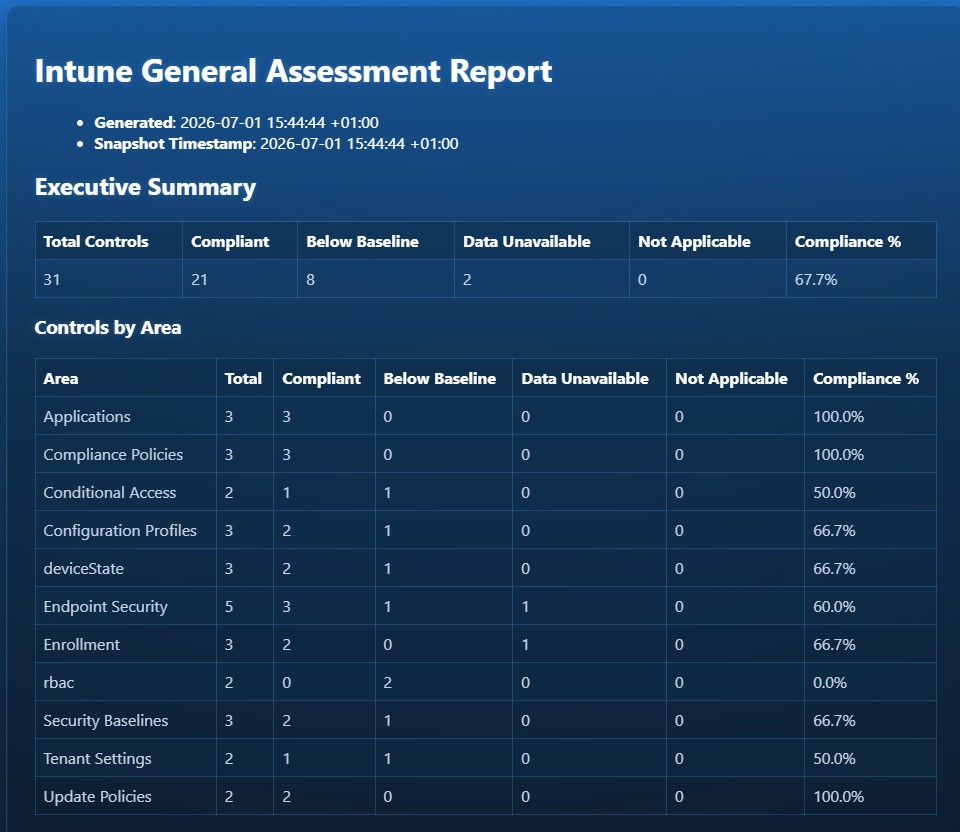
Executive Summary and Controls Findings from the General Asssessment Report
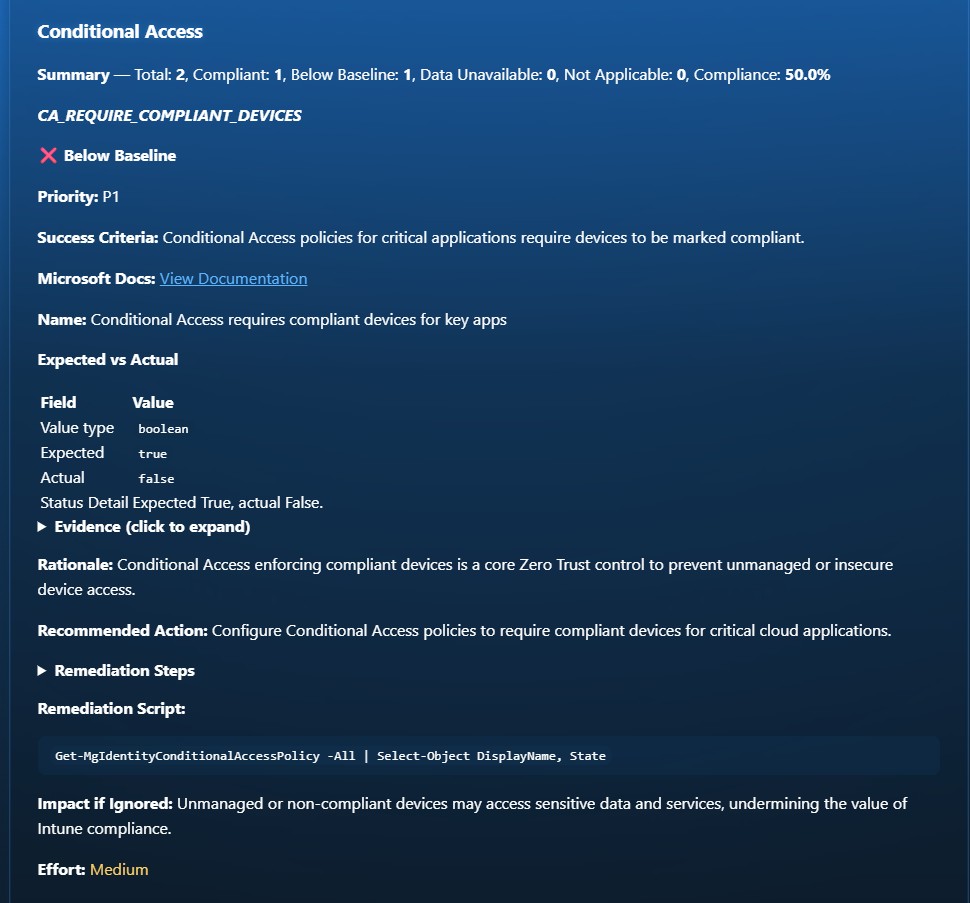
Conditional Access Assessment
What IntuneAuditor Is Not
Just so we're clear:
- It’s not a replacement for Microsoft Defender, Purview or Secure Score
- It doesn’t inspect email or document content
- It doesn’t automate compliance frameworks
- It doesn’t make changes to your environment
Instead — it shows you the configuration reality, so you can decide what to do with it. No noise, no padding, no guesswork.
From Visibility to Insight
IntuneAuditor is evolving beyond individual audit reports into a structured workspace that enables organisations and partners to understand their environments at scale.
As multiple audits are performed across tenants and over time, patterns begin to emerge - highlighting risks, inconsistencies, and opportunities that would otherwise remain hidden.
- Identify the most common configuration gaps across environments
- Highlight controls that consistently fall below baseline
- Track improvements in security posture over time
- Prioritise remediation based on real-world impact
This transforms audit data into something far more valuable - not just visibility, but meaningful insight into how Microsoft 365 environments are actually being managed.
Built for Multiple Environments
IntuneAuditor is designed to support organisations and partners working across multiple Microsoft 365 tenants.
A centralised workspace allows audit results to be explored and compared, enabling a clear understanding of overall configuration health and risk across environments.
- View multiple tenants in a single workspace
- Gain a consolidated operational overview across environments
- Ensure consistency in configuration and reporting
- Improve prioritisation of remediation efforts
For service providers, this provides visibility not just into individual customers, but into how configurations are implemented across the entire portfolio.
See IntuneAuditorWorkspace in Action
IntuneAuditorWorkspace provides a structured workspace for analysing Microsoft 365 environments, allowing results to be explored, compared, and understood over time.
Rather than reviewing isolated reports, organisations can work with their data in context — identifying risks, tracking changes, and prioritising what matters most.
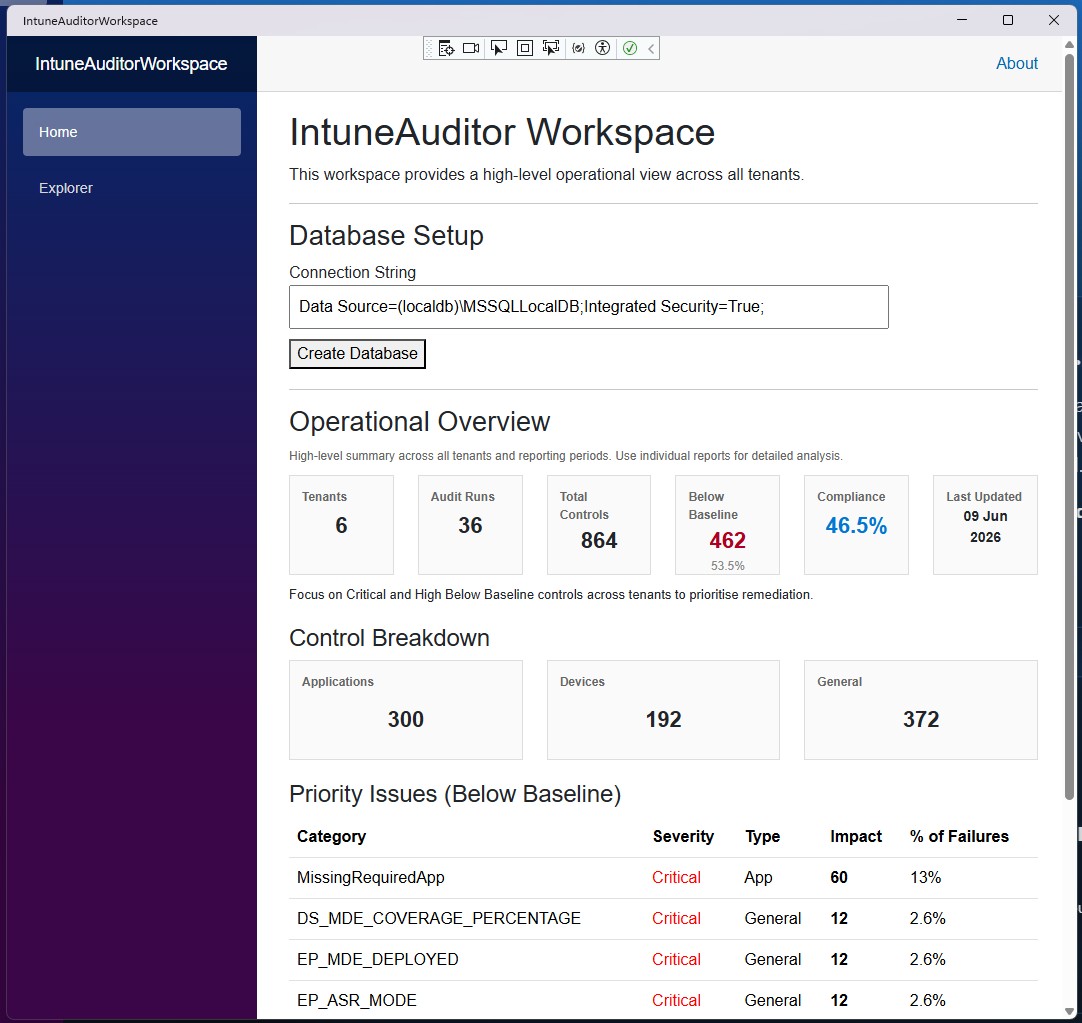
Aggregated operational view highlighting compliance levels, control coverage, and priority issues across environments.
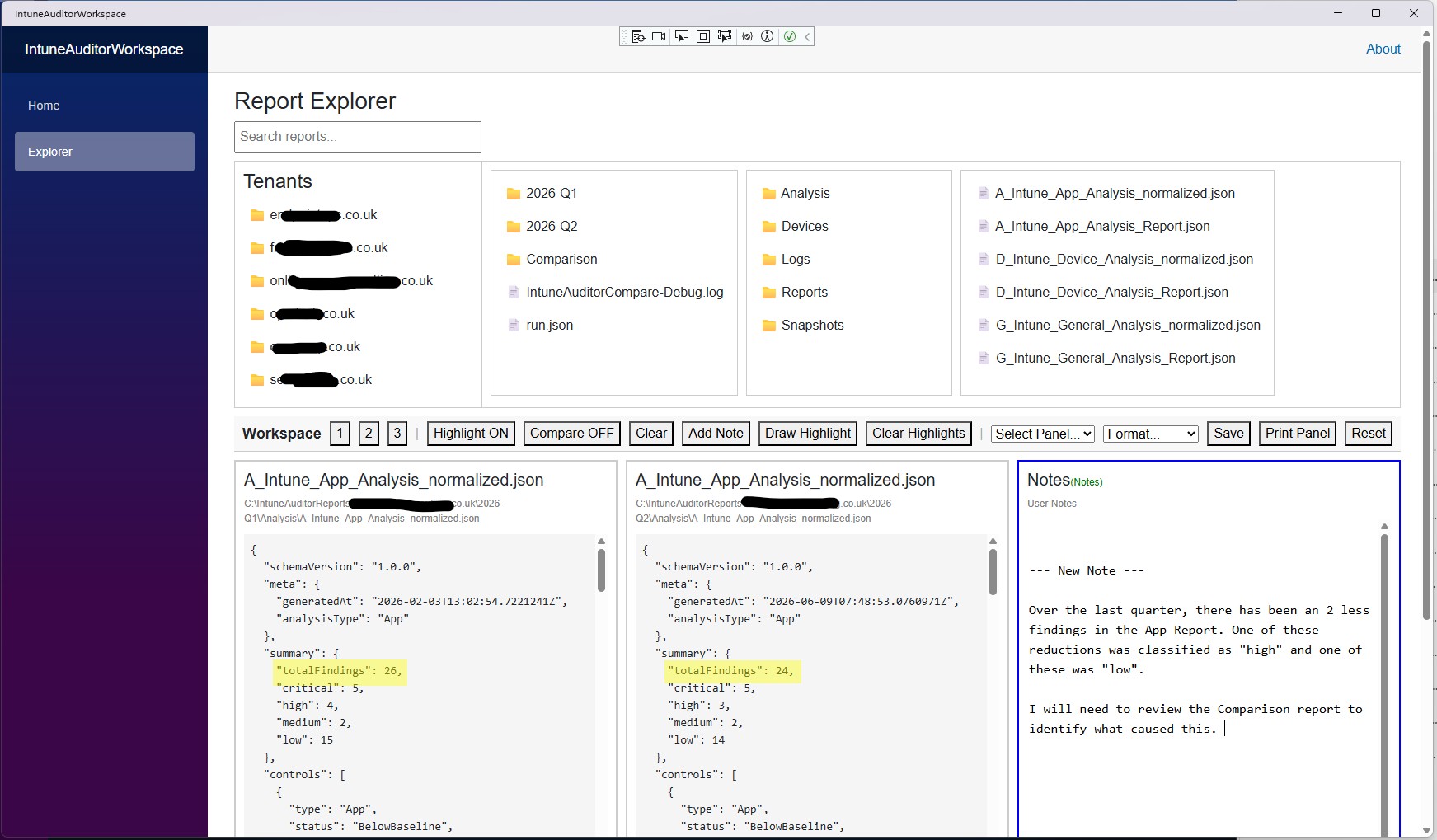
Explore, compare, and analyse audit results across tenants and reporting periods within a single workspace.
Who This Helps
Whether you're responsible for IT, security, operations or governance, IntuneAuditor gives you clarity and confidence about your estate:
- IT Managers wanting to understand their configuration health
- Technical teams preparing for internal reviews or board reporting
- Growing organisations trying to get control of their Microsoft 365 estate
- Service providers who manage multiple tenants and want consistent output
- Anyone who has ever inherited “someone else’s configuration”